The short answer: Claude is useful for the parts of work that ADHD makes hard — getting started, breaking big things into small ones, and remembering what is due — if you change two privacy settings first and treat it as a planning tool, not a clinician. You do not need a diagnosis to use anything on this page. Nothing here diagnoses or treats ADHD. If you think you may have ADHD, an evaluation is a separate step: Stanford routes → · Bay Area prices →
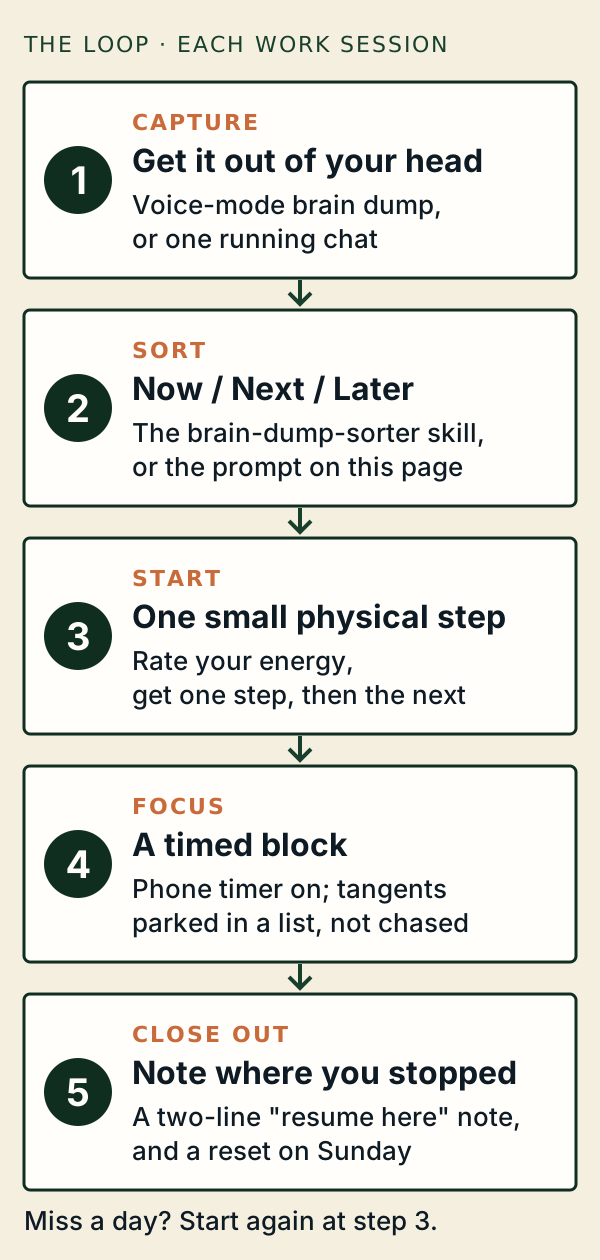
What the research says, honestly
There are no randomized trials of AI assistants for adult ADHD. What exists is small and mostly interview-based, from 2024 to 2026. It agrees on what helps and what goes wrong.
| Study | Who | What it found |
|---|---|---|
| Pinto et al., OZCHI 2025¹ | 13 adults with ADHD, seven-day diary | Used "to support executive function and emotional regulation" |
| Zhu, Yu & Luo, CHI 2026² | 20 students with ADHD, 5 experts | Breaking tasks into steps helps starting; experts warned of "over-reliance" and "new distractions" |
| Chen, Meng & Nie, CSCW 2026³ | 42 adults who identify with ADHD | Worry about "becoming overly dependent" and systems that favor tracking over action |
| Pimenova et al., 2026 preprint⁴ | 14 software engineers with ADHD | AI as a work companion helps accountability; it cannot replace human support |
| Ara et al., 2025 preprint⁵ | 12 people, small experiment | Tasks done faster with a human or AI "body double" than alone |
What that means for you: use Claude to get moving, then let it get out of the way. If you spend more time setting up the system than doing the work, the system is the problem.
Before you start: change two settings
- Decide what Claude remembers. By default, Claude's memory "does not store topics related to personal or sensitive subject matter, like your health." You can opt in to "Include sensitive topics in memory." For most people, leaving it off is the better trade: describe your tasks, not your symptoms.⁶
- Check model training. On personal plans, training on your chats is a choice you make in privacy settings. For anything personal, use an incognito chat: these "aren't saved to your chat history or to Claude's memory," though they are kept for 30 days by default.⁷ ⁸
Students: your university may give you Claude with its own data rules. Stanford, for example, approves Claude Chat for everything except protected health information. Stanford details →
Set-ups by sticking point
| If this is hard… | Use this | How | Plans |
|---|---|---|---|
| Starting | Any chat, or the one-next-step skill below | "Energy 3 out of 10. The task is my lit review. Give me one two-minute step. Only one." | All |
| Too much in your head | Voice mode for a spoken brain dump⁹ | Talk for three minutes, then: "Sort that into Now, Next, Later." | All (beta) |
| Losing track of a class or project | Projects, one per class or project, with the syllabus or plan added¹⁰ | "List every deadline in the next three weeks with a start-by date." | All; Free gets five projects |
| Calendar chaos | Google Calendar, Gmail, Microsoft 365 or Todoist connectors¹¹ ¹² | "Find two 90-minute focus blocks before Thursday and draft holds. Show me before creating them." | All; Free connects one tool |
| Time blindness | Reminders on iPhone, or timers on Android¹³ | "Remind me at 3 p.m. to stop and eat." Claude cannot keep time inside a chat. | All |
| Hyperfocus and losing the evening | Break reminders and quiet hours: Settings › Wellbeing¹⁴ | Set a daily nudge after two hours, and quiet hours after 11 p.m. Neither is a hard lock. | Free, Pro, Max, Ultra (beta) |
| Dreading an email | The message-dread-breaker skill | Paste it; get three reply lengths. You send it, not Claude. | All |
| Getting to Claude without falling into tabs | Quick entry on Mac: double-tap Option¹⁵; home-screen widget on phones¹⁶ | One keystroke, one question, back to work | All |
| The Sunday review never happens | Scheduled tasks in Cowork¹⁷ | A weekly "what's due" summary that runs even when your laptop is closed | Paid plans |
| Wanting a tool that fits your brain | Artifacts, which can now save data between sessions¹⁸ | See the dashboard below | Artifacts all plans; saved data on paid plans |
Seven free skills you can install
A skill is a small instruction file Claude loads when your request matches it. We wrote these seven. Each one asks your energy level or narrows to one step, avoids pep talks, says plainly that it cannot keep time, and stops the task to give you 988 if you mention being in danger.
| Skill | What it does | Download |
|---|---|---|
| one-next-step | Asks energy 1–10, then gives one small physical step at a time | ZIP |
| brain-dump-sorter | Turns a messy list into Now (max three), Next, Later and Let go, each with a first action | ZIP |
| focus-block-partner | A quiet co-worker for one timed block; parks tangents in a list | ZIP |
| deadline-radar | Reads a syllabus, plan or calendar; lists deadlines with start-by dates | ZIP |
| message-dread-breaker | What a message says vs. how it feels, plus three reply drafts | ZIP |
| weekly-reset | Fifteen-minute review: done, slipped, three priorities, Monday's first step | ZIP |
| advisor-meeting-prep | Turns scattered research notes into a one-page agenda (for graduate students) | ZIP |
To install in the Claude app: turn on code execution ("Create and edit files" in the newer settings layout). Then go to Customize › Skills, click +, then Create skill, then Upload a skill, and choose the ZIP without unzipping it.¹⁹ Anthropic's Help Center lists skills on every plan, including Free; one developer page says custom uploads need a paid plan, so if the upload option is missing on Free, that is why.¹⁹ ²⁰
In Claude Code: unzip into ~/.claude/skills/, so the file sits at ~/.claude/skills/one-next-step/SKILL.md.²¹
Build your own dashboard
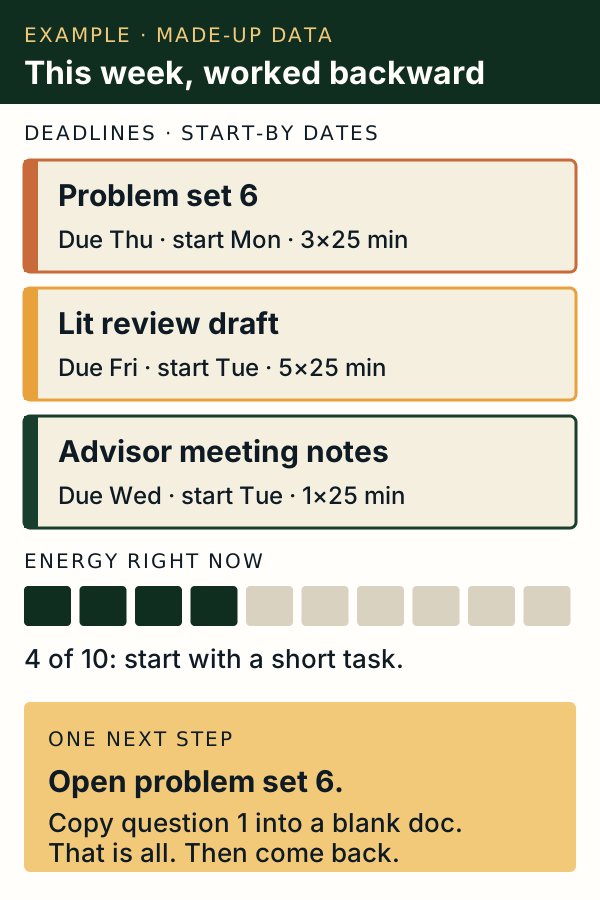
Paste this into Claude, with your syllabus or task list attached:
"Build me a one-page dashboard as an artifact. Show my deadlines for the next three weeks, earliest first, each with a start-by date and an effort estimate in 25-minute blocks. Add an energy slider from 1 to 10 that suggests a short task when energy is low. Add one 'next step' box. Use large text and no more than three colors. Save my changes between visits."
Saving changes between visits needs a paid plan. Before typing anything personal into a saved artifact, check whether it uses shared storage that other people can see.¹⁸
A project that remembers your semester
Create a project called "This term," add your syllabi, and paste this into its instructions:¹⁰
"I work best in 25-minute blocks. When I ask what to do, give one task, not a list. When I share a deadline, give me a start-by date. Keep replies short. Do not encourage me or lecture me; just help me take the next step."
Project instructions apply to every chat inside that project, so you only set this once.
For people who code
Claude Code can build the small tool you actually want: a script that collects the week's deadlines into one morning message, or a focus timer that logs what you finished. Skills, hooks and subagents let you package a routine once and reuse it.²¹ Two cautions from the research: AI waiting time can break flow and hyperfocus, and rigid timers can too.⁴ Keep tools simple.
If you use Cowork, note that on most personal plans its default mode keeps working "without stopping to ask about each step."²² For anything that sends, books or deletes, switch it to ask first.
How this goes wrong
The studies above name the same risks:
- Over-reliance. Planning with Claude feels productive. Doing the task is what counts.²
- Agreement. Chatbots tend to agree with you, which "can unintentionally reinforce" an unhelpful way of seeing a task.² Ask it to argue the other side.
- New distractions. A chat is one more tab. Close it when the step is clear.²
- Accuracy. Check dates, names and numbers against the source.
If you notice you are using a chat instead of talking to a person when you are struggling, close it and call someone. In crisis, call or text 988.
How to judge other ADHD-and-AI guides
A lot of advice online is good. Before you install anything, check:
- Is a "skill" really a skill? A skill is a folder with a
SKILL.mdfile that loads when relevant. Some guides call other files "skills."²¹ - Are menu paths current? Claude's settings changed in 2026. Ours were checked on the date at the top of this page.
- Does it promise results? "Actually works" is a sales line. No study has shown that.
- Does it have a crisis route? Anything that coaches emotions should point to 988.
Further reading
- Associated Press, "People with ADHD are turning to AI apps to help with tasks. Experts say try it cautiously," August 2024 — a balanced report that features a Claude user and calls the research "inconclusive."²³
- ADDitude, "'A Cognitive Collaborator:' How Adults with ADHD Are Using ChatGPT," updated May 2025 — reader stories, with a warning that AI makes mistakes.²⁴
- University of Minnesota Disability Resource Center, "Disorganized Input: AI, Access and the Neurodivergent Brain," July 2026 — a recorded talk on why loose, unorganized input suits these tools.²⁵
We looked for widely viewed videos on this topic but could not confirm view counts or watch them through our tools, so we do not list any yet.
Q&A
Do I need an ADHD diagnosis to use these? No. These are planning aids for anyone who finds starting, sorting or remembering hard. A diagnosis is a separate decision.
Can Claude remind me to do things? Not inside a normal chat. On iPhone it can create Reminders, on Android it can set timers, and on paid plans scheduled tasks can run on a cadence.¹³ ¹⁷
Is it safe to tell Claude about my ADHD? By default Claude's memory does not store health topics. For anything personal, use an incognito chat, and describe tasks rather than symptoms or medication.⁶ ⁷
Are the skills on this page free? Yes. Download the ZIPs above and upload them in Customize › Skills.
Our therapist directory: See its current status → · ADHD therapy: what works →
Sources (all read November 6, 2026)
- Pinto et al., "'A little bit of a life raft' – Exploring the Use and Experiences of ChatGPT as a Support Tool among Adults with ADHD," OZCHI 2025 — doi.org.
- Zhu, Yu & Luo, "Scaffolding Metacognition with GenAI: Task Management for University Students with ADHD," CHI 2026 — doi.org.
- Chen, Meng & Nie, "'Not Just Me and My To-Do List': Task Management for Adults with ADHD and AI-Augmented Social Scaffolds," CSCW 2026 — arxiv.org.
- Pimenova et al., "Two's a Crowd: Human and AI-Based Copresence for Developers with ADHD," 2026 preprint — arxiv.org.
- Ara et al., "You Are Not Alone: Designing Body Doubling for ADHD in Virtual Reality," 2025 preprint — arxiv.org.
- Claude Help Center, chat search and memory — support.claude.com.
- Claude Help Center, incognito chats — support.claude.com.
- Anthropic Privacy Center, model training — privacy.claude.com.
- Claude Help Center, voice mode — support.claude.com.
- Claude Help Center, what are projects and creating projects.
- Claude Help Center, connectors — support.claude.com.
- Claude connector directory: Google Calendar, Todoist; Help Center, Microsoft 365.
- Claude Help Center, Claude with iOS apps and Claude with Android apps.
- Claude Help Center, break reminders and quiet hours — support.claude.com.
- Claude Help Center, quick entry on Mac — support.claude.com.
- Claude Help Center, iOS widgets and Android widget.
- Claude Help Center, scheduled tasks — support.claude.com.
- Claude Help Center, artifacts — support.claude.com.
- Claude Help Center, use skills in Claude and create custom skills.
- Claude Platform docs, Agent Skills overview — platform.claude.com.
- Claude Code docs, skills and hooks.
- Claude Help Center, Cowork permission modes — support.claude.com.
- Associated Press via KSL, August 2024 — ksl.com.
- ADDitude — additudemag.com.
- University of Minnesota Office for Digital Accessibility — accessibility.umn.edu.
Claude's features change often; we recheck this page every 30 days. Clinical review is not yet claimed. TherapyCalifornia has no relationship with Anthropic and is not paid to mention Claude.
Paid for by participating therapists. Inclusion is computed from published information — never purchased. No ads, no data sold.